Getting Started
This guide gets you from a new account to your first reviewed prospect. The core path takes about 15 minutes: add a property, publish your prospect link, test it, then review the submission.
When you open the dashboard, the setup checklist (Get your prospect link ready) on the Overview page follows the same steps. For a short guided tour of the dashboard, click Restart tour on the checklist.
Create your account
Sign up at rentalot.ai and confirm your email address with the verification link. Every new account starts on the 7-day Free Trial.
Add your first property
Your account includes a sample property ([Sample] 742 Sunflower Lane) so you can explore. The checklist only counts a real property, so add one of your own:
- In the checklist, click Add property. (You can also open Properties from the sidebar and click Add Property.)
- Enter a Property Title. Save now to keep it as a private draft.
- Add the details prospects ask about: address, rent, bedrooms, bathrooms, availability, pet policy, parking, and photos.
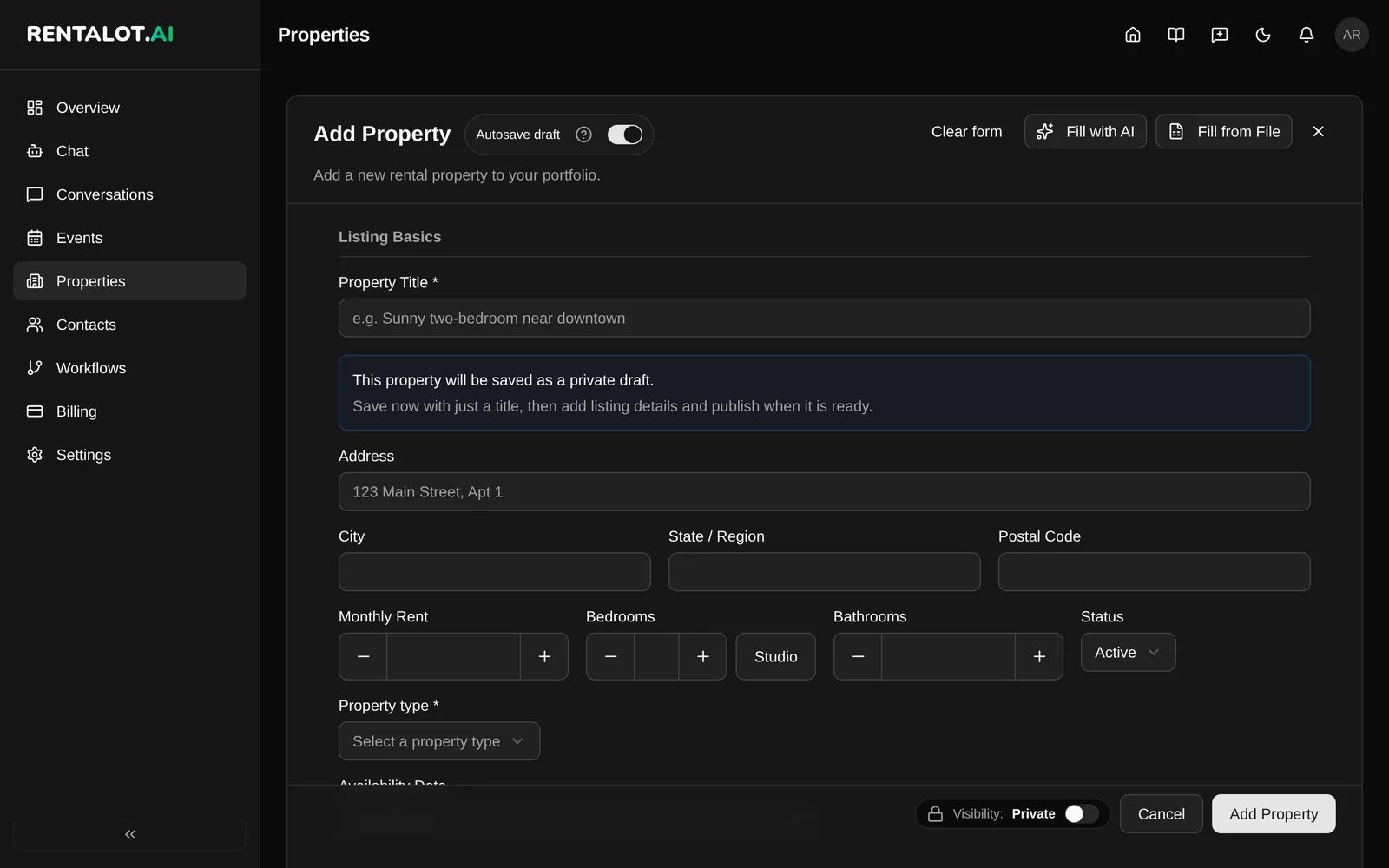
To publish a property, it needs a title, street address, monthly rent greater than zero, and a bathroom count greater than zero. The more detail you add, the better your AI agent can answer prospect questions.
Have many listings? Import them from a spreadsheet instead.
Publish your prospect link
Your prospect link is where prospects answer your pre-screening questions: rentalot.ai/p/your-slug/prescreening.
- In the checklist step Publish your prospect link, turn on the switch. The status changes to Active — prospects can reach your AI agent.
- Click Copy prospect link next to the URL.
You can change the same setting later in Settings > Public Pages > Public prescreening enabled. To change your-slug, edit URL Slug on that tab.
Test the link yourself
Open the link in a private browser window, or use the Open prospect link in a new tab button in the checklist, and complete the questionnaire as if you were a prospect. Use an email address you can check.
When you finish, Rentalot creates a contact with your answers. If Application completed is on in Settings > Notifications, you also get an email about the new submission.
Review the submission and respond
- Open Contacts and select the contact you just created.
- Open the pre-screening submission to read every answer.
- Mark it Approved or Denied, and add private notes if you like.
- Take the next step: send a booking link, share your property blast link, or reply to the prospect.
Once the test looks right, share your prospect link on listings, in email replies, and on flyers. See the Rental Workflow Guide for the full prospect-to-showing flow.
Ask your AI assistant
In the checklist step Ask your AI assistant, click Open AI assistant. The management chat opens with a suggested question ready to send, or pick one of the examples under Try asking:. The step checks off after your first message. See Management chat and AI assistant.
Optional next steps
The checklist lists these under Optional next steps. Both need the Starter plan or higher. On the Free Trial they’re marked Starter+ with an Upgrade to unlock button that opens Billing.
- Set up email. Connect Gmail, Microsoft 365, or custom SMTP in Settings > Integrations so you can email prospects from your own address and reply from Conversations. See Email.
- Set up calendar. Connect Google Calendar or Cal.com in Settings > Integrations so showings sync to your calendar. See Showings.
Your prospect link works without email or a calendar. Connect them when you’re ready to respond and schedule from inside Rentalot.
Keep going
- Workflows: customize your pre-screening questions or build your own questionnaire.
- Contacts: manage prospects, submissions, and next steps.
- Management chat and AI assistant: manage your rentals in plain language.
- Slash Commands: instant lookups in the management chat.